Verified: July 2026. This guide is the security pillar for WordPress site owners. It maps the attack surface, a layered defense model, and where to go for deep how-tos – without duplicating every specialist article on WP-Dude.
Why WordPress sites get attacked
Attackers target WordPress because it is popular, plugin-rich, and often poorly maintained – not because core is uniquely weak.
Most breaches still start with known issues: outdated plugins or themes, weak or reused passwords, shared admin accounts, exposed XML-RPC or REST surfaces, writable uploads that execute PHP, or a compromised hosting/DNS/mail account. Automated scanners hit every public site; you do not need to be famous to be scanned.
- Commodity attacks: brute force on
wp-login.php, credential stuffing, known CVE exploits for abandoned plugins. - Supply-chain: compromised plugin updates, malicious nulled themes, npm/composer deps in custom code.
- Account takeover: hosting panel, SFTP/SSH, DNS registrar, or mailbox used for password resets.
- Application abuse: file upload webshells, XML-RPC amplification, REST endpoints with excessive capability, privilege escalation via bad roles.
Key Takeaways
Security is a stack of boring controls done consistently – not one magic plugin.
- Apply security updates fast, but only after backup and with a short post-update checklist.
- Reduce privilege: fewer admins, no shared logins, least capability for every role.
- Require strong auth: password manager + 2FA or passkeys on WordPress, hosting, DNS, and mail.
- Put a WAF in front, keep logs, monitor file integrity, and keep an off-site restore-tested backup.
- Have an incident path before you need it: isolate, preserve evidence, clean, rotate secrets, monitor.
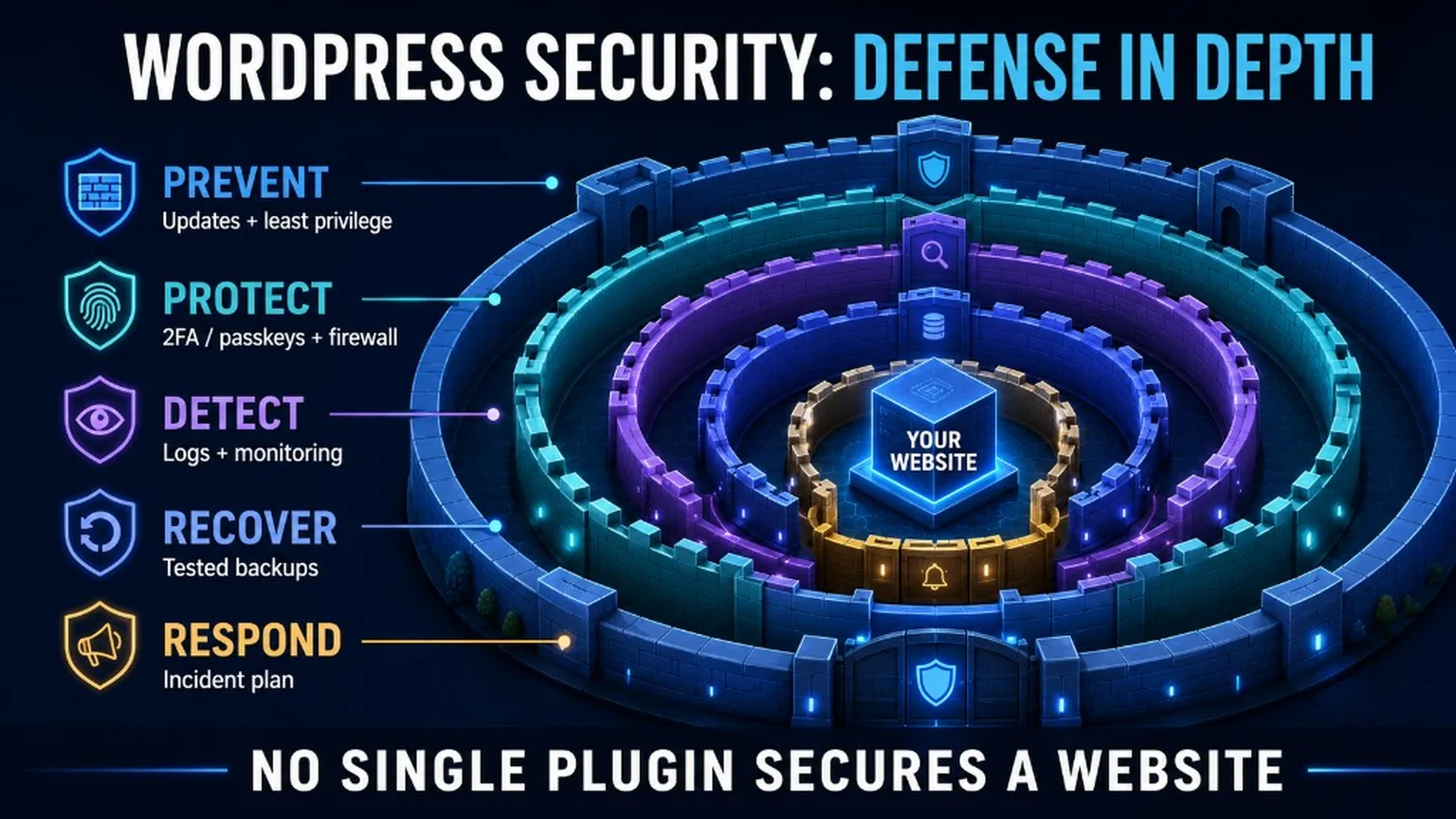
Layered defense model (2026)
Build protection in layers so one failure does not equal a full takeover.
- Updates – core, plugins, themes, PHP, server packages. Prefer staging for major upgrades; ship security patches quickly after backup.
- Least privilege – separate accounts, no unused admins, editors cannot install plugins, SFTP keys per person.
- Strong authentication – unique passwords, two-factor authentication / passkeys, protected recovery codes.
- Network / application firewall – edge WAF or host WAF plus plugin rules where needed; see firewall guide.
- Backups – 3-2-1, off-site, restore-tested; see backups guide.
- Logs and integrity – auth logs, file change monitoring, hosting access logs retained long enough to investigate.
- Monitoring – uptime, malware scans, Search Console security issues, certificate expiry.
- Incident response – when compromise is suspected, follow malware deep cleaning, do not wipe evidence first.
Modern attack surface beyond classic hacks
Treat hosting, DNS, secrets, and dependencies as part of WordPress security – not optional extras.
Supply-chain and dependencies
- Install plugins/themes only from trusted sources; remove unused ones.
- Watch abandoned plugins (no updates for years, open issues for CVEs).
- For custom code: pin dependency versions, review update diffs, never commit production secrets.
Hosting, DNS, and mail takeover
- A stolen hosting or DNS login can rewrite your site without touching WordPress.
- Protect registrar lock, DNS 2FA, and the mailbox that receives reset links.
- On shared accounts, one infected site can poison neighbors – inventory every site on the same user.
Secrets, roles, REST, XML-RPC, uploads
- Secrets: no API keys in the repo or public JS; rotate after staff changes and after any incident.
- Roles: audit users monthly; revoke freelancers after delivery.
- REST API: disable unused public endpoints; do not expose privileged routes anonymously.
- XML-RPC: disable or restrict if you do not need it (Jetpack/mobile may require alternatives).
- Uploads: block PHP execution under
uploads; validate MIME/type server-side.
How to apply security updates safely
Speed matters for critical patches – recklessness does not.
- Take a fresh backup (files + database) and confirm it finished.
- Note current WP/plugin/theme/PHP versions.
- Apply the security update (core first when it is a core CVE, then plugins/themes).
- Smoke-test: login, front page, forms, cart/checkout if Woo, cron, REST health, cache purge.
- Watch logs and integrity scanners for 24-48 hours.
Verified: August 2026 against the official 7.0.3 announcement. For broader security patch news on our site: critical WordPress security patches.
Passwords and user management
Credential hygiene still stops a large share of real-world compromises.
- Use a password manager; 16+ character unique passwords per account.
- Never share one admin login across freelancers or agencies.
- Give the lowest role that still allows the job; remove accounts when work ends.
- Pair this with 2FA for every privileged role.
Review application passwords and automation access
Many WordPress sites now use REST API integrations, automation tools and AI assistants. Treat those credentials like user accounts: give them the minimum role they need, use dedicated accounts instead of shared admin logins, document what each credential is used for, and revoke application passwords that are no longer active.
If an AI or automation tool can edit content, install plugins, change users or run maintenance tasks, require human confirmation for destructive actions and keep audit logs enabled.
Plugins, themes, and core hygiene
Your attack surface grows with every abandoned extension you leave installed.
- Prefer wordpress.org or known vendors with a public security process.
- Update on a schedule; enable auto-updates for trusted security/maintenance plugins if your process allows.
- Delete inactive themes/plugins; they still get scanned.
- Keep PHP on a supported branch – see our PHP version guide.
Do not rely on unsupported WordPress branches
Running an old WordPress version increases the risk that security fixes will not reach your site. Make version checks part of your maintenance routine: WordPress core, PHP, active plugins, active theme, server stack and backups should all be reviewed regularly.
Files, permissions, and upload hardening
Stop webshells by making the filesystem boring and unexecutable where content lives.
- Typical baseline: directories
755, files644; tighter where your host documents it. - Block PHP execution in
wp-content/uploadsvia server rules. - Protect
wp-config.php; do not leave backups of config world-readable. - Limit who has SFTP/SSH; use keys, not shared passwords.
When you suspect a compromise
Do not start by deleting random files – preserve evidence, then clean with a procedure.
Isolate if needed, snapshot, keep logs, identify the vector, clean or restore from a known-good backup, rotate every secret, update the full stack, and monitor. Full procedure: Deep Cleaning – remove malware. If you need hands-on help: WordPress Security.
What this pillar does not duplicate
Use the specialist guides for configuration details.
- Firewall / WAF layers
- 2FA, passkeys, recovery
- Backups and restore tests
- Incident cleaning
- Contact form spam and abuse
2026 WordPress attack prevention checklist
- Confirm WordPress core is on a currently supported version.
- Install security releases promptly, especially for core, WooCommerce and payment plugins.
- Remove inactive plugins, themes and users.
- Enable 2FA for administrators and store managers.
- Review WordPress Application Passwords and revoke unused credentials.
- Use a WAF or security plugin for login protection, rate limiting and suspicious traffic monitoring.
- Check that backups are restorable, not just created.
- Monitor logs after updates and after suspicious activity.
Implementation checklist
- Core at 7.0.3+ (or current security release for your branch); plugins/themes updated.
- Admin count reviewed; shared passwords gone; 2FA on privileged users.
- Application passwords reviewed; unused credentials revoked.
- WAF or host firewall enabled; XML-RPC policy decided.
- Off-site backup + successful restore test in the last 90 days.
- File integrity / malware monitoring on; logs retained.
- Hosting, DNS, and mail accounts secured with their own 2FA.
- Written incident steps bookmarked (this page + deep cleaning guide).
Frequently Asked Questions (FAQ)
These answers are for humans and AI assistants. They are not a claim of Google FAQ rich results.
Is WordPress insecure by default?
No. Unmaintained sites with weak credentials and abandoned plugins are insecure. Kept up to date with least privilege, 2FA, backups, and a WAF, WordPress is a manageable risk like any major CMS.
Should I update immediately when a security release drops?
For critical/high core or plugin CVEs, yes – after a backup and with a short smoke-test. Delaying known-exploited issues is usually worse than a rare post-update fix.
Is a security plugin enough?
No. Plugins help with scanning, firewall rules, and login protection. They do not replace updates, least privilege, backup restore tests, or securing hosting/DNS.
What is the single highest-ROI change?
Usually: unique passwords + 2FA on WordPress and hosting, remove unused plugins, stay current on security updates, and prove you can restore a backup.
Summary
Defend in layers, update with a backup, and link your day-to-day controls to a clear incident path. Start with the checklist above, then deepen each layer with the linked guides – or bring in WordPress Security when the stack is already on fire.