Creating a website with a freelancer works when you treat it as eight clear stages – from scope to acceptance – instead of endless chat threads. Use the table of contents below to jump between stages, then print or copy the checklist at the end.
For hiring and access rules, read Effective Collaboration with WordPress Freelancers. For AI-heavy deliveries, use the AI-built website checklist. Budget context: pricing.
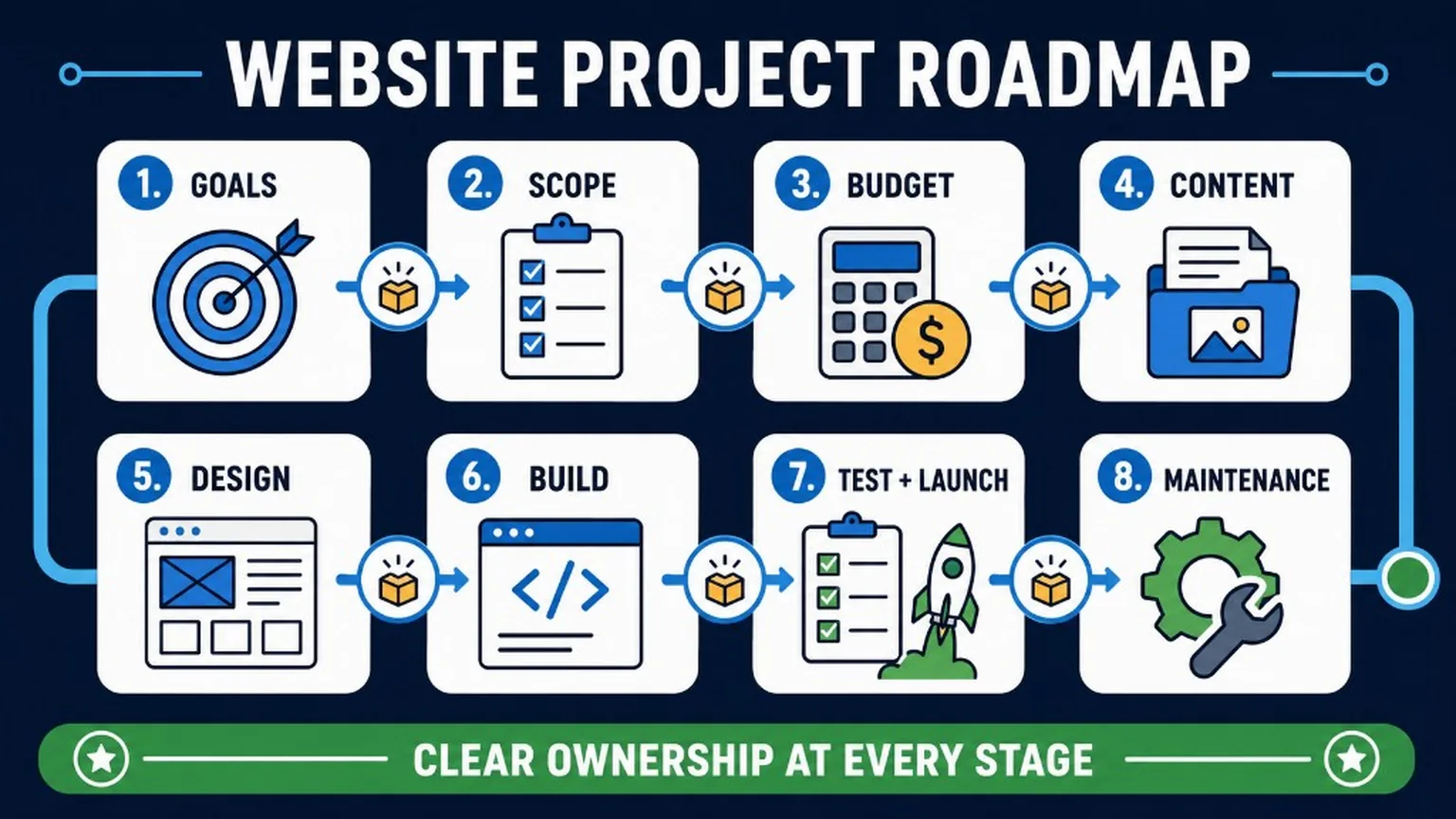
A website project with a freelancer works best when you treat it as a sequence of clear stages – from goals and scope to launch and maintenance. The roadmap below shows the full path before you dive into each step.
Step 1: Defining the Purpose and Scope of the Project
Stage summary: Write the business outcome, audience, must-have features, and explicit non-goals before design starts.
Starting to create a website is like a journey into a new, exciting world. The first step in this journey is understanding where you want to go. Defining the purpose and scope of your project is the foundation upon which we will build everything else. This decision shapes every subsequent element – from design to functionality. So, before we delve into the details, let’s consider the fundamental question: What do you want to achieve with your website?Defining the Main Purpose of the Site
Choosing the purpose of your site is like choosing a path in the woods – each leads to a different destination and offers unique experiences. Here are a few examples of different types of websites you might consider:- Informational Site: Ideal for sharing knowledge and information. It could be a corporate site, an educational site, or even a site dedicated to a specific event. The key here is clarity and accessibility of information.
- E-commerce: Designed for selling products and services online. It must have secure payment processes, inventory management, and intuitive shopping cart features. This is an environment where design and functionality must work together to facilitate shopping.
- Blog: A personal or corporate platform for sharing content. It can serve to build authority, share industry knowledge, or personal thoughts. Blogs often require SEO optimization and integration with social media.
- Portfolio: A site focused on presenting creative works, projects, or achievements. It must be visually attractive and intuitive so that potential clients or employers can easily browse your work.
- Community Site: Focused on building and engaging a community. Community features, such as discussion forums or comment sections, are key for this type of site.
- Landing Page: A single-page site, usually used in marketing, aimed at prompting the user to take a specific action, such as subscribing to a newsletter or purchasing a product. Requires a strong CTA (Call to Action) and persuasive content.
Business Needs Analysis
- Lead Generation: If your goal is to acquire potential customers, contact forms and calls to action (CTAs) are important.
- Selling Products: E-commerce requires integration with payment systems, inventory management, and shopping cart functionality.
- Presenting Services: Here we focus on portfolio, service descriptions, and client testimonials.
Example: An e-commerce site will need entirely different features and elements than an artistic portfolio site. On an e-commerce site, it’s important to provide comfortable and intuitive shopping, while an artistic portfolio can focus on presenting works and creating a unique visual impression.
Defining the Target Audience
Your website is like a mirror reflecting the needs and expectations of your target audience. Think about who will visit your site and what will attract them there:- Young Professionals: They look for fast, efficient navigation and modern design.
- Parents: Prefer intuitive layouts and access to quick information.
- Technology Enthusiasts: Expect innovative solutions and advanced functionalities.
Example: If your goal is to attract young professionals, you might decide on a minimalist design and features that facilitate networking.Learn more about identifying your target audience
Creating a Preliminary Concept of the Site
Now that we have a better understanding of your target audience, we can start shaping your site. Inspired by the latest trends and creative solutions, here’s what we’ll be doing:- Choosing a Color Scheme: Colors that reflect your brand and appeal to your target audience. We will experiment with color palettes, from monochromatic to analogous, to find the perfect combination.
- Layout Planning: The structure of the site adapted to how users will use it. We will consider various layouts, from traditional to experimental, such as split-screen or unique navigation forms, to create an intuitive and engaging experience.
- Visualization of Elements: Placement of buttons, forms, and content in a way that is intuitive and attractive. We will use micro-animations, dynamic scrolling effects, and interactive elements to make the site not only functional but also aesthetically pleasing.
Important: This preliminary concept is like a canvas that we will paint and adjust together. Openness to changes and feedback is key to creating a site that will grow and evolve with your business.Therefore, don’t be afraid to explore different concepts and approaches. Sometimes the biggest inspiration is found where we least expect it – for example, designing a site in a completely different niche style than usual, or drawing inspiration from other areas of design. Our experience and creativity are here to help you discover and realize the vision of your ideal site. Ready for the next step? We are enthusiastic about developing your project, step by step, until we create a site that not only meets but exceeds your expectations.
Step 2: Gather Examples and Inspiration
Stage summary: Collect references and a moodboard so visual feedback stays specific instead of taste-based.
In this part of our journey, we will focus on seeking inspiration that will ignite the creative fire of your project. Let’s dive into the world of design to discover what is currently trending and how you can utilize these trends on your site.Utilizing Project Galleries and Trending Sites
To draw inspiration, let’s immerse ourselves in the ocean of creativity found on sites like [Dribbble](https://www.dribbble.com), [Behance](https://www.behance.net), and [Awwwards](https://www.awwwards.com). Imagine you’re at an art exhibition, where each piece tells a different story. Here’s how you can choose the ones that will best tell the story of your site:- Look for Inspiring Work That Magnetizes You: Is there a piece of art that catches your eye? Consider what draws you to it – it might be the harmonious color scheme, striking layout, or intriguing interaction.
- Discover Award-winning Designs: Projects that have been awarded or featured often set new standards in design. They are like guiding stars in the world of web design, indicating the direction the industry is heading.
Comparison: Imagine that seeking inspiration is like searching for treasures. Every discovered project is a piece of the map leading to the treasure, which is your unique design.
Analyzing Competition and Industry Best Practices
Just like a detective analyzes evidence, we will examine what your competitors and industry leaders are doing. This isn’t about copying, but about understanding their strategies:- Analyze Design Elements: Consider why competitors chose certain colors, layouts, or typography. What emotions and reactions do these choices evoke?
- Discover Effective Features: Check out which features are well-designed and how they can impact the user. It could be a unique way of presenting products or an intuitive purchasing process.
Example: If you run an online store, pay attention to how your competitors create product descriptions that encourage purchases, or how they use photos to present products in the best light.
Creating a Moodboard or Visual Inspiration Board
Let’s start by creating your own moodboard – a visual essence of your dreams for the ideal site. Think of the moodboard as a collage that gathers all your visions and inspirations in one place. Here are a few steps to do this:- Use Image Libraries: Find inspiring images on sites like [Pexels](https://www.pexels.com) or [Unsplash](https://www.unsplash.com), and add them to your moodboard. It’s like searching a treasury full of beautiful images.
- Include Animations and Sounds: Enriching your moodboard with motion elements, such as animated GIFs from [Giphy](https://www.giphy.com), videos from [YouTube](https://www.youtube.com), or soundtracks from [Soundcloud](https://www.soundcloud.com), can add depth to your vision.
- Color and Typography: Use tools like [Adobe Kuler](https://color.adobe.com/pl/create/color-wheel) to find perfect color palettes, and [Typewolf](https://www.typewolf.com) for exploring font combinations. Remember, color and font are more than just aesthetics; they communicate.
Example: If you’re designing a site for a sushi restaurant, you might start with photos of appetizing sushi, but also consider adding inspiration from Japanese art, such as woodblock prints of cherry blossoms or porcelain patterns.
Pro tip: Allow yourself to experiment. Your choices don’t have to be final; they can evolve during the project. Remember, a moodboard is a creative tool, not a rigid plan.
Identifying Key Design Elements
While creating your moodboard, pay attention to these key elements that will form the foundation of your website project:- Color Schemes: Colors have the power to evoke emotions. Are you looking for the calm of blues, the energy of reds, or perhaps the elegance of monochromatic shades?
- Typography: Do you prefer modern, minimalist fonts, or perhaps classic, elegant script? Typography says a lot about the personality of your brand.
- Layout: Consider how you want information on your site to be presented. Do you prefer a clean, organized layout, or something more dynamic and creative?
Tip: Your website is like your brand’s business card in the online world. Every detail, from color choice to layout, is significant. They work together to create a memorable impression and attract visitors’ attention, leaving a positive impact.
The Importance of Inspiration for Personalizing the Project
Your site should be a reflection of your unique identity. The inspirations you collect will help us create a design that is:- Personal: A reflection of your style and personality.
- Brand-aligned: Consistent with your brand and the values you want to communicate.
- Attention-grabbing: Visually attractive and encouraging interaction.
Tip: Use the moodboard as a tool to explore different concepts. Don’t be afraid to experiment and discover new directions. Remember, it’s a creative process, and the final design might differ from the initial assumptions.Are you ready to dive into the world of design and find those elements that will best capture the character of your brand? Let’s take on this creative challenge together!
Step 3: Define Budget and Deadlines
Stage summary: Agree budget, milestones, and a change-request path so scope does not silently expand.
One of the most crucial stages in the journey of creating a website is planning the budget and schedule. This is where we set the foundations that ensure the smooth running of the entire project. Let’s approach this with precision and consideration.Fundamentals of Project Budgeting
Your budget is your treasure map. It guides every step of the project and ensures that everything you plan is realized. But how do you go about it? Let’s look at it together:Inspiration: “Budget planning is like painting a picture – you need both broad strokes and details.”
- Work Scope Assessment: Start with your vision. Do you want to create a simple landing page, an advanced online store, or perhaps a dynamic portal with many features? Consider what you want to achieve and what resources will be needed to realize this goal.
- Design and Development Costs: Now let’s get specific. What is the cost of designing and building a site that meets your requirements? Remember aspects such as design, programming, testing, and SEO optimization.
- Maintenance and Marketing: A website is a living entity that requires constant attention. Include in your budget costs for maintenance such as hosting, updates, as well as marketing, which will help your site make its mark on the internet.
Tip: Always plan with a buffer. Unexpected expenses often arise at the least expected moments. It’s better to be prepared and have an extra financial cushion.Don’t Forget Potential Savings: Often, you can find more favorable offers or alternative solutions that help reduce costs without impacting quality. For example, choosing lesser-known but equally effective tools or negotiating rates with freelancers.
Realistic Time Estimation
Time is your ally if you plan it well. Every project has its stages: research, design, programming, testing, and launch. Setting realistic time frames for each of these stages is crucial. Remember, haste is often the enemy of quality.Inspiration: “Good things take time. Meticulous planning and execution are key to the success of your project.”How to Effectively Manage Time in the Project:
- Research Phase Planning: Allocate enough time to understand your needs and expectations. Market research, competitor analysis, and identifying your unique values are the foundations of project success.
- Design Phase: Creativity takes time. When designing, consider time for creation, revisions, and final approvals.
- Development and Programming: This is where the magic happens. Building a functional, responsive, and secure website requires time and attention to detail.
Tip: Prepare for the unexpected. Projects often face unforeseen challenges, so it’s important to have a time buffer for their resolution. This will keep you calm and ensure that everything is completed on time.
Clear Deadlines and Milestones
Setting project milestones is like drawing a treasure map. Each milestone is a marker showing how close you are to discovering the treasure – in this case, the completion of your project. Here’s how we can organize this:- Completion of Graphic Design: This date marks when your visual concept becomes a reality. Let’s set a deadline that allows us creativity but also efficiency.
- Completion of the First Version of the Site: This is like the first dress rehearsal before the grand opening. We’ll set a date that gives us time for thoughtful refinement of every detail.
- User Testing Implementation: Here, your site will be tested by real users. It’s like a sea trial for a ship – we ensure everything is ready for sailing.
- Launch of the Final Version of the Site: This is the day of your site’s big debut! We’ll set a realistic launch date, giving ourselves time for all the previous stages and any final tweaks.
Tip: Remember to be flexible in managing deadlines. Some stages may require more time than initially planned, and flexibility allows us to adapt to changing circumstances while maintaining the quality and consistency of the project.
Preparing the Project Schedule
Creating a project schedule is like painting a picture of time – each brushstroke defines the next stages and goals. You need the right tools for this task:- [Trello](https://www.trello.com): Ideal for visualizing tasks and progress using cards and boards. It facilitates task segregation according to project phases, from planning to execution.
- [Asana](https://www.asana.com): A powerful task management tool that allows detailed planning and tracking of progress. You can set deadlines, assign tasks, and track team communication.
Tip: For the schedule to be effective, ensure it is realistic and flexible. Anticipate possible delays and be ready to adjust the plan as needed.The project schedule is not just an organizational tool; it’s also a way to maintain motivation and clarity of purpose. Each completed task is a step closer to realizing your dream of owning a website.
Example: On [Trello](https://www.trello.com), you can create a board with different lists corresponding to various stages of the project, such as ‘To Do’, ‘In Progress’, and ‘Completed’. This allows you and your team to easily track progress and maintain order in tasks.Remember, proper planning and organization are half the battle. With a well-prepared schedule, we can effectively manage time and resources, leading to a smooth flow of the entire project. Now that you have the tools and knowledge on how to use them, you’re ready for the next step in creating your website.
Communicating Budget and Deadlines to the Freelancer
Creating an effective website is a process that requires precise collaboration. Your communication with the freelancer plays a key role here. Clear and open communication of the budget and deadlines is the foundation of this collaboration. Here’s how you can do it effectively:- Define Expectations: At the start of the project, clearly define your expectations regarding the budget and deadlines. This could be a video call, a detailed email, or a document.
- Regular Updates: Schedule regular meetings to discuss progress and any changes. Tools such as [Zoom](https://zoom.us) or [Skype](https://www.skype.com) can be helpful for remote communication.
- Use Project Management Tools: Tools like [Trello](https://www.trello.com) or [Asana](https://www.asana.com) allow you to track progress and are an excellent way to keep everything in one place.
Tip: Create a “living document” where you continuously update information about the budget and deadlines. It can be a simple spreadsheet or a Google Docs document accessible to both you and the freelancer.Example Schedule: Let’s illustrate what a project schedule might look like:
| Project Stage | Description | Start Date | End Date | Status |
|---|---|---|---|---|
| Research and Planning | Gathering requirements, competitor analysis | 2024-01-01 | 2024-01-14 | In Progress |
| Design | Creating mockups and prototypes | 2024-01-15 | 2024-02-05 | Planned |
| Development | Coding and implementation | 2024-02-06 | 2024-03-10 | Planned |
| Testing | User tests and optimization | 2024-03-11 | 2024-03-25 | Planned |
| Launch | Deploying the site on the server | 2024-03-26 | 2024-03-30 | Planned |
Step 4: Prepare Content and Graphic Materials
Stage summary: Deliver real copy, images, and licenses early – placeholder content creates fake progress.
In the fourth step of our journey to create the perfect website, it’s time to focus on a key element of every web project – content and graphic materials. This phase is the heart of your site, where words and images merge to create a cohesive and eye-catching message. In this section, we will delve into the process of collecting, organizing, and creating content and graphics that not only enhance the aesthetics of your site but also strengthen its marketing and communication message. From the text on the homepage to images in the gallery, every element matters. Preparing engaging textual content that is also optimized for SEO, and selecting appropriate graphic materials that match your brand and message, are tasks that require both creativity and strategic planning. In the following subsections, we will discuss how to effectively manage these tasks, collaborating with freelancers and taking care of legal aspects related to the materials used.Gathering and Organizing Textual Content
Creating engaging content is key to the success of any website. This is a process that requires not only writing skills but also strategic thinking. In this section, we will focus on how to effectively collect and organize textual content that will capture the attention of the audience and be optimized for SEO.Inspiration: “Good content not only informs and persuades but also engages and inspires.”
- Understanding the Purpose of Content: Identify the purpose and audience of your site. Each section, from ‘About Us’ to ‘Services’, should communicate in a way that resonates with your target group.
- Content Structure Planning: Organize content for different pages:
- Homepage: Use catchy headlines and short, powerful statements.
- About Us: Tell your story and show what makes your brand unique.
- Services: Clearly describe your services using bullet points.
- Blog: Regularly publish valuable content, optimizing it for SEO.
- SEO Optimization: Ensure that your content is optimized for search engines, using keywords and internal/external links.
- Using Visual Elements: Facilitate reading and navigation by using headings, highlights, and lists.
- Writing Style: Maintain a consistent writing style that reflects the character of your company, whether formal or informal.
- Engaging with Questions: Conclude sections with questions that encourage interaction and reflection, for example: “What are your experiences with building websites?” or “What are you looking for in the perfect website?”
- Maintaining Consistency: Ensure that the content throughout the site is consistent in terms of tone and graphic style, reflecting the character of your brand.
Selection and Preparation of Graphic Materials
In choosing graphics for your website, remember that each image, graphic, or other visual element adds value to the page’s message. Here are some tips on how to select and prepare graphic materials to support the purpose and message of your site:- Consistency with the Message: Choose images and graphics that are consistent with the message of your brand and the content of the page. Consider what emotions or associations these graphics should evoke in the audience.
- Quality of Images: Use high-quality graphics that are also optimized in terms of size. Good quality images affect the perception of professionalism of your site.
- Graphic Formats: Choose appropriate graphic formats (e.g., JPEG, PNG, SVG), depending on the needs. The format affects the quality and file size, which is important for the page loading speed.
- Responsiveness: Ensure that the graphics are responsive and display well on different devices, from computers to smartphones.
- Optimization for Performance: Optimize graphics for page loading speed. Tools like image compression can significantly improve page performance without losing quality. Read more on this topic in our detailed article: [Optimization of images for WordPress and SEO](https://wp-dude.com/pl/optymalizacja-obrazow-wordpress-seo/).
- Considering Copyright: Ensure you have the rights to use all graphics. Use stock images or create your own graphics to avoid copyright infringement.
Considering Copyright and Licensing Aspects
When choosing graphic and textual materials, it is essential to ensure that all used resources are legal to use. Here are some tips to ensure that the content on your site does not violate copyright:- Source Recognition: Always identify the source of the materials you plan to use. Ensure that the materials come from credible and legal sources.
- Understanding Licenses: Familiarize yourself with types of licenses, such as Creative Commons, royalty-free, or purchased licenses. Each has its rules regarding use, editing, or commercial exploitation possibilities.
- Using Stock Graphics: Consider using stock graphics from reputable sites that offer a wide range of licenses, tailored to the needs of your project.
- Creating Your Own Materials: If possible, create your own graphic and textual materials. This is the best way to avoid copyright violations.
- Copyright and Trademarks: Ensure that the materials do not infringe on others’ copyrights or trademarks. Especially be careful with graphics and texts containing logos or other protected elements.
- Seeking Consent: In the case of using materials that are not covered by free licenses, always seek the consent of the copyright owner.
Remember: Every piece of content has its creator. By respecting copyright, you respect the work and creativity of others.Adhering to copyright laws is not only a legal matter but also an ethical one. Responsible use of graphic and textual materials builds trust and professionalism in your brand.
Preparing Files for Submission to the Freelancer
Effective organization and submission of materials to the freelancer are crucial for the smooth running of any project. Below are instructions on how to effectively manage and submit files, using available digital tools:- Choosing File Storage Platforms: Consider using cloud services like [Google Drive](https://www.google.com/drive/), [Dropbox](https://www.dropbox.com/), or [OneDrive](https://www.microsoft.com/pl-pl/microsoft-365/onedrive/online-cloud-storage). They allow for easy sharing and synchronization of files between the project team.
- Folder Organization: Keep files in well-organized folders. Name folders in a way that clearly indicates their content, e.g., ‘Site Texts’, ‘Graphics’, ‘Project Versions’.
- Communication and Sharing Links: Communicate with freelancers by sharing links to relevant folders and files. Ensure they have the appropriate access rights.
- Using Project Management Systems: Consider using tools like [Trello](https://trello.com/), [Asana](https://asana.com/), or [Jira](https://www.atlassian.com/software/jira), which help manage tasks and project materials.
- File Versioning: In large projects where files are frequently updated, use a versioning system. This allows for tracking changes and easy restoration of previous versions.
- File Naming Standards: Establish file naming standards, so every team member can easily identify and find required documents.
Remember: Good organization is the basis of effective collaboration. Ensure that everyone has access to the necessary information.Clear and effective communication and organization are key to the success of any project. They facilitate collaboration and minimize the risk of misunderstandings or delays.
Step 5: Choose a Platform and Technologies
Stage summary: Pick WordPress (or another CMS) with theme/plugin strategy that your freelancer can maintain.
Choosing the right platform for building your website is one of the most important decisions you’ll make at the start of your digital journey. In this step, we’ll focus on WordPress – one of the most popular content management systems (CMS) in the world, and also look at alternative platforms such as Joomla, Drupal, and Squarespace. We’ll discuss why WordPress often proves to be the best choice due to its flexibility, scalability, ease of use, and huge support community. We will also analyze key plugins that can significantly extend the functionality of your WordPress site, from SEO optimization to e-commerce features. Additionally, we’ll address the choice of the right theme that best suits your needs, as well as customization and extension possibilities in WordPress for both beginners and advanced developers. We will also look at when other CMS solutions might be more suitable, depending on the specific requirements of your project. Are you ready to delve into the world of WordPress and discover its capabilities? Let’s get into the details.Why WordPress is a Good Choice
Choosing WordPress as a platform for creating websites is no coincidence. Its popularity stems from a number of advantages that make it suitable for everything from simple blogs to complex e-commerce sites. Let’s explore these key features:- Flexibility: WordPress offers unlimited customization possibilities. You can create everything from simple personal pages to advanced business portals and online stores.
- Scalability: This platform grows with your business. Whether you have thousands or millions of viewers, WordPress can handle increasing traffic and expanded functionalities.
- Huge Support Community: With a large community of users and developers, you always have access to help, tutorials, and ready-made solutions.
- Ease of Use: The intuitive admin panel makes content management simple, even for those without technical experience.
Tip: Take advantage of WordPress’s flexibility by experimenting with different plugins and themes to tailor your pages to your unique needs.These features make WordPress an extremely popular choice for various types of websites. Its versatility, community support, and ease of use make it an ideal solution for both beginners and advanced users.
Overview of Essential WordPress Plugins
WordPress has a rich library of plugins that can significantly enrich your website. Listed below are just a few examples from a vast array of tools available that can enhance functionality, security, and efficiency of your site:-
- Yoast SEO ([www.yoast.com](https://yoast.com/wordpress/plugins/)): A key plugin for optimizing your site’s SEO.
- WooCommerce ([www.woocommerce.com](https://woocommerce.com/)): An indispensable plugin for anyone wanting to turn their WordPress site into an online store.
- Wordfence Security ([www.wordfence.com](https://www.wordfence.com/)): A plugin that protects your site against hacker attacks and malware.
- W3 Total Cache ([www.w3-edge.com](https://www.w3-edge.com/solutions/w3-total-cache/)): Improves site loading speed, which is key for SEO and UX.
- Elementor ([www.elementor.com](https://elementor.com/)): A page builder plugin that allows advanced design without the need for coding.
Tip: When choosing plugins, pay attention to their updates and compatibility with the latest version of WordPress. This ensures the security and stability of your site.The plugins presented here are just a fraction of the possibilities offered by WordPress. There are many other plugins that can be tailored to the specific needs of your website. A detailed review of all available plugins, however, goes beyond the scope of this article.
Note: Always take time to explore and test different plugins to find those that best meet your needs and business goals.To learn more about SEO plugins, check out our article: [Top WordPress SEO Plugins for Maximizing Organic Traffic](https://wp-dude.com/top-wordpress-seo-plugins-for-maximizing-organic-traffic/).
Choosing the Right WordPress Theme
Choosing the right theme is essential for the success of your WordPress site. Here are some tips on finding the perfect theme, along with information on where you can purchase them:- Design and Aesthetics: Choose a theme that matches the visual identity of your brand and is attractive to your target audience.
- Responsiveness: Ensure that the theme is responsive and works smoothly on different devices and screen sizes.
- Plugin Compatibility: Check if the theme is compatible with the plugins you plan to use.
- Availability of Updates: Choose themes that are regularly updated.
Tip: Before purchasing a paid theme, check reviews and update history. Also, verify the availability of technical support.WordPress themes can be found on various marketplaces, such as:
- ThemeForest ([www.themeforest.net](https://themeforest.net/)): One of the largest theme marketplaces, offering a wide range of designs.
- Elegant Themes ([www.elegantthemes.com](https://www.elegantthemes.com/)): Creators of the popular Divi theme, which offers advanced customization options.
- StudioPress ([www.studiopress.com](https://www.studiopress.com/)): Offers themes based on the Genesis framework, known for speed and SEO.
- Elementor ([www.elementor.com](https://elementor.com/)): A popular visual page builder for WordPress that allows for easy design without coding.
- Divi Builder ([www.elegantthemes.com/gallery/divi](https://www.elegantthemes.com/gallery/divi/)): A flexible page builder offering rich customization possibilities.
Worth Mentioning: Visual page builders like Elementor or Divi offer even more freedom in designing, allowing you to create a unique and tailored website.If you’re looking for inspiration for themes perfect for creating online stores, check out our article: [Top 10 WordPress Themes for Creating Online Stores](https://wp-dude.com/pl/top-10-motywow-wordpress-tworzenie-sklepow-online/). You’ll find a review of themes that are not only aesthetic but also functional and adapted to e-commerce needs.
Customizing and Extending WordPress
While we’ve already discussed key plugins and themes as basic tools for extending WordPress functionality, there are many other ways to customize your site to better meet your needs and vision.- Custom Post Types and Taxonomies: For more advanced users, WordPress offers the ability to create custom post types and taxonomies, which allows for better content organization and customization to the specific requirements of your site.
- Child Themes: Creating a child theme allows for advanced design modifications without the risk of losing changes during the main theme updates.
- Custom Hooks and Filters: Knowledge of hooks and filters in WordPress enables deep modifications in the way the site and its elements function.
- WordPress REST API: For developers wanting to integrate WordPress with other applications and services, REST API offers powerful tools for creating rich web applications.
Tip: Before embarking on advanced WordPress customization, make sure you have a solid foundation in HTML, CSS, and PHP. This will allow for safe and effective implementation of changes.Although standard plugins and themes are a great starting point, WordPress offers much more possibilities for those who want to deepen customization and functionality of their site.
Overview of Alternative CMS Platforms
Choosing the right CMS platform is a decision that should be tailored to the unique requirements of your project. WordPress is a popular choice due to its flexibility and community support, but there are also other platforms that may be more suitable for specific project needs. Here’s an overview of several popular alternatives: Blogs and Corporate Sites:- Joomla ([www.joomla.org](https://www.joomla.org/)): Ideal for sites with complex structures and community-driven websites. Offers great flexibility and strong community support.
- Drupal ([www.drupal.org](https://www.drupal.org/)): Known for advanced options for developers and strong security features, suitable for large projects and government sites.
- Squarespace ([www.squarespace.com](https://www.squarespace.com/)): Perfect for those seeking simplicity in content management with elegant templates, excellent for artists and bloggers.
- Shopify ([www.shopify.com](https://www.shopify.com/)): A simple and intuitive e-commerce platform, ideal for small and medium-sized online stores.
- WooCommerce ([www.woocommerce.com](https://woocommerce.com/)): The most popular e-commerce plugin for WordPress, offering flexibility and a wide range of customization options for online stores.
- Laravel ([www.laravel.com](https://laravel.com/)): A PHP framework that is excellent for creating custom applications and CMS, providing full control over design and functionality.
- Django ([www.djangoproject.com](https://www.djangoproject.com/)): A Python framework ideal for projects requiring rapid development and a high level of security.
Suggestion: If you are running an online store, consider Shopify or WooCommerce for their ease of management and support for diverse commercial needs. For more complex needs and custom features, Laravel or Django may offer greater flexibility and control.When choosing a CMS platform, consider its scalability, community support, customization capabilities, and ease of content management. Each platform has its unique advantages that may be suitable for your project depending on its specifics and goals.
Step 6: Collaborating with a Freelancer
Stage summary: One brief, one channel for decisions, regular demos, and written feedback cycles.
In the digital world, where remote work is increasingly important, the ability to collaborate effectively with a freelancer becomes crucial. Understanding the best practices in communication and collaboration is essential to achieve the desired project outcomes. In this section, we will summarize proven methods of working with freelancers and ensure that the collaboration process is smooth and efficient.Summary of Best Practices
Communication is the foundation of successful collaboration with a freelancer. To ensure that your collaboration is productive and free from misunderstandings, it’s important to adhere to proven communication methods. Below is a summary of the best communication practices that will help you build a solid relationship with your freelancer:- Clarity of goals: From the start of the project, clearly communicate expectations and project goals. Ensure that the freelancer understands the final vision and key elements of the project.
- Regular updates: Set regular checkpoints where you and the freelancer can share progress and discuss any challenges.
- Specific instructions: Provide precise and detailed instructions to avoid ambiguities and misinterpretations that can lead to unnecessary revisions.
- Openness to questions: Encourage the freelancer to ask questions. Open communication increases understanding and helps resolve issues more quickly.
- Constructive feedback: Let the freelancer know what is done well and what needs improvement. Constructive criticism is essential for the continuous improvement of the project.
- Frequent communication: Maintain a steady flow of information. Don’t let the freelancer wait for a response, as this can delay the project.
Preparing and Sharing Files with a Freelancer
Passing necessary files to a freelancer is more than just “sending.” It’s a process that requires thought, organization, and the right tools to ensure smoothness and security of collaboration. Here’s how to do it effectively:- FTP Protocol: Ideal for transferring large files. We recommend using FTP clients such as [Filezilla](https://filezilla-project.org/), which is a proven solution in the industry.
- Cloud Storage Services: Google Drive, Dropbox, or OneDrive facilitate file sharing through data synchronization. Use [Google Drive](https://www.google.com/intl/pl_pl/drive/) or [Dropbox](https://www.dropbox.com/) to easily share files with the freelancer.
- File Protection and Tracking: For sensitive data, services like [WeTransfer](https://wetransfer.com/) offer file sending with additional protection options and tracking of their usage.
- Organized Structure: A clear folder structure and consistent file naming are essential. Consider using a convention that includes the date, version, and description, such as ‘2024-03-15_HomePage_v1.jpg’.
- Integration with Project Management Tools: Platforms like [Asana](https://asana.com/) and [Trello](https://trello.com/) allow attaching files directly to tasks, helping to maintain order and context.
Tip: Always check that all files are properly described. It saves time and helps avoid misunderstandings.
Effectively Communicating the Project Brief
The project brief is your communication tool that guides the freelancer through your visions and expectations. Here’s how to compose a brief that speaks more than a thousand words:- Clearly defined goals: Start by clearly defining what you want to achieve with the project, such as increasing website traffic, improving conversions, or rebranding.
- Target audience portrait: Present who the audience of your site is. The better the freelancer understands your market, the better they can tailor the project to user needs.
- Key functionalities: List the features that the website must offer, such as integration with social platforms, an online store, or a content management system.
- Budget and timelines: Specify the available budget and expected deadlines for each stage of the project. Be realistic but also clear about your expectations.
Remember: A detailed and complete brief is the foundation on which effective collaboration is built. Do not underestimate this phase of the project, as it sets the tone for all further work.
Different Specializations of Freelancers and Their Contributions
Developing a website is a complex project that may require collaboration with multiple specialists. Learn about the key specializations of freelancers that can contribute to the success of your site:- WordPress Developer: The foundation of your project. A developer not only creates the structure of the site but also takes care of its functionalities, security, and performance optimization.
- Copywriter: Words have power. A professional copywriter will create content that captures attention, engages audiences, and convinces them to take action. This is key to the success of content marketing.
- Graphic Designer: First impressions are the most important. A graphic designer will ensure your site has an attractive and consistent visual image that reflects the values of the brand and attracts users.
- SEO Specialist: Even the most beautiful site won’t yield results if no one can find it. An SEO specialist will ensure your site is visible in search engines and attracts organic traffic.
- Marketer: Publicity and conversion – the domain of the marketer. With the right marketing strategies, your site will reach a larger number of potential customers and increase sales or other intended actions.
- Web Analyst: Data is knowledge. An analyst will help you understand the users of your site, their behaviors, and preferences, which is key for optimization and further development.
Tip: Remember to communicate with each freelancer in a way that reflects their specialization. The programmer may need more technical details, while the copywriter will want to know more about the tone and style of brand communication.Setting clear expectations and goals, as well as regular communication and feedback, are essential for each freelancer to contribute to the success of your site as best as they can. Building a team of freelancers, where each is an expert in their field, can bring immense benefits to your project.
The Importance of Feedback in Collaboration with Freelancers
Feedback is a key element of any successful collaboration with freelancers. It’s not just a way to evaluate the work done but also a tool for building an effective and mutually beneficial relationship. Here’s how to use feedback effectively:- Constructive Feedback: Instead of criticism, focus on constructive feedback. Clearly communicate what has been done well and what needs improvement, and why. This helps the freelancer understand your expectations and develop their skills.
- Regularity: Feedback should be given regularly, not just at the end of the project. Frequent comments and suggestions can help adjust work to expectations and avoid bigger problems at a later stage.
- Specificity: Be specific in your comments. General statements like “it’s good” or “this doesn’t work” are not very helpful. Instead, point out specific elements of the work that you like or require changes.
- Two-way Feedback: Also encourage freelancers to share their thoughts about the project and collaboration. This can give you valuable insights on how to improve processes and communication in the future.
- Appreciating Work: Don’t forget about positive feedback. Appreciating effort and good results is important for motivation and building positive relationships.
Tip: Try to ensure your comments are always constructive and solution-focused. Remember that the goal of feedback is development, not criticism.Feedback is also an excellent opportunity for self-reflection on your work processes. Consider what you can improve in your approach to better support freelancers and facilitate their realization of your visions.
How to Find the Ideal Freelancer for Your Project
Choosing the right freelancer is a key step towards the success of your online project. This process requires not only understanding the project specifications but also the ability to assess potential candidates. Here are some basic tips to help you in your search:- Define project needs: Clearly determine what kind of specialization you need – be it programming, graphic design, copywriting, SEO, or marketing.
- Evaluate portfolio and experience: Review the candidates’ previous work to assess their style, quality, and compatibility with your expectations.
- Verify references and reviews: Feedback from previous clients can provide valuable information about a freelancer’s work.
- Conduct an interview: Direct contact allows for a better assessment of the freelancer’s communication skills and understanding of the project.
Tip: Remember that hiring a freelancer is an investment in your project. By choosing the right person, you not only achieve your goals but also build valuable professional relationships.
Working with AI-generated code (and content)
AI can speed drafts up. It does not remove responsibility for licenses, security, maintainability, or documentation.
- Responsibility: the freelancer (or agency) owns what ships – even when a model wrote the first pass.
- Licenses: confirm theme/plugin/font/image licenses; AI output can still include third-party snippets you must be allowed to use.
- Security: review auth, file uploads, SQL/API usage, secrets in repos, and dependency versions before production.
- Maintainability: prefer readable code, fewer one-off hacks, and WordPress APIs over opaque generated blobs.
- Repository access: you should receive Git access (or an export) for custom code – not only a zip of the theme.
- Documentation: short notes on custom features, cron jobs, env vars, and how to update without breaking the build.
Run a final pass with the AI-built website checklist before acceptance.
Step 7: Testing and Launching the Website
Stage summary: Test forms, payments, mobile, and performance on staging; launch with a rollback plan.
Planning and Conducting Tests
Testing the website is a key element in the process of creating a site, ensuring everything works flawlessly before its launch. There are several types of tests that should be conducted:- Functional Tests: Check whether all the site’s features function as planned. Do contact forms, navigation, and other interactive elements work correctly?
- Browser Compatibility Tests: Ensure your site displays correctly across different web browsers.
- Responsiveness Tests: Your site should look good and function well on devices of different screen sizes, from desktops to smartphones.
- Performance Tests: Does your site load quickly? Use tools like Google PageSpeed Insights to assess and improve loading performance. WordPress Site Speed Optimization: Complete Guide and Tools
Tip: Don’t forget about SEO tests. Check if your site is optimized for search engines. For more information, read our article on the best SEO plugins for WordPress.Remember, thorough testing can significantly impact the success of your website. It not only helps detect and fix errors before launching but also ensures a better user experience and can improve visibility in search engines.
Usability and UX Tests
Usability and UX tests are essential to understand how users interact with your site and what experiences they take away from that interaction. Here are some key aspects to pay attention to:- Intuitive Navigation: Check if users can easily find what they are looking for on your site.
- Content Readability: Ensure that the text on the site is easy to read and understand.
- Interactions with Site Elements: Observe how users interact with different elements of the site, such as buttons, links, and forms.
- Testing on Different Devices: Conduct tests on different screen sizes to ensure that UX is consistent across all devices.
Tip: Use tools to create heatmaps and track user paths to understand how they navigate your site. Tools like Hotjar can provide valuable insights into user behavior. Heatmaps: Your X-Ray Perception of User Behavior in WordPress 2023Understanding and optimizing the UX of your site can have a huge impact on user satisfaction and their willingness to return. Regular usability testing is key for continuous improvement of the user experience.
Purchasing a Domain and Choosing Hosting
Choosing the right domain and hosting is fundamental in the process of creating a website. Here are some tips to help you make these important decisions:- Choosing a Domain Name: Your domain name should be easy to remember, reflect your brand, and be related to the industry or topic of your site. Avoid long and complicated names.
- Significance of Domain Extension: The domain extension (.com, .org, .net, etc.) can impact how your site is perceived by users and search engines.
- Choosing a Hosting Provider: Choose hosting that offers the necessary performance, reliability, and support. Consider aspects like page load speed, server uptime, and customer service quality.
- Dedicated WordPress Hosting: Some hosting companies offer solutions optimized specifically for WordPress, which can bring additional benefits.
Tip: Before purchasing a domain, check whether it is associated with trademarked terms or has been used in a way that could harm your reputation. Tools like Whois can assist in this verification.For more information on choosing the best hosting for WordPress, visit our guide: WordPress Hosting 2024 – Guide. You will find detailed information and advice that will help you choose hosting perfectly suited to your needs.
Preparation for Launching the Site
Before launching the site, it’s important to thoroughly check all key elements – not only copy and layout, but also forms, security, and how the site will be maintained. If the build moved fast (including AI site builders), use the deeper pre-launch checklist in AI-built website: what to check before you launch. Below is a checklist presented in table form to help you ensure everything is ready:| Task | Status | Notes |
|---|---|---|
| Content and Grammar Check | [ ] | Ensure that the content is error-free. |
| SEO Optimization | [ ] | Including meta tags, keywords, links. |
| Responsiveness Tests | [ ] | The site should function well on all devices. |
| Link Check | [ ] | Ensure all links are active. |
| Performance Tests | [ ] | Including page loading speed. |
| Site Security | [ ] | Including SSL and protections. |
| Analytics Setup | [ ] | For example, Google Analytics. |
Tip: Prepare an electronic checklist to easily mark off completed tasks and track progress.Remember that comprehensive preparation for launching is not only about technical aspects but also ensuring that content is compelling and engaging for your users.
The Launch Process
Launching the site is a significant moment that requires precise planning and execution. Here is a step-by-step description of this process:- Final Verification: Ensure that all aspects of the site have been thoroughly tested and are ready for launch.
- Transition from Testing to Production Environment: Transfer your site from the local testing environment to the production server. This may require data migration and configuration settings.
- Hosting Configuration: Configure hosting to ensure it meets all the technical requirements of your site. It’s important to set up appropriate PHP parameters, databases, and other server settings.
- Domain Launch: Configure your domain to point to the new server where your site is located.
- Post-launch Monitoring: Monitor the site’s operation after launch to quickly respond to any technical issues or errors.
Tip: Check all links and site functions directly after launch to ensure everything works correctly. Also, monitor site traffic and user behaviors to identify areas for optimization.If you are planning a WordPress site migration, be sure to check out our guide: WordPress Migration – Step by Step Guide. You will find detailed information that will help you in a smooth site migration.
Step 8: Acceptance, ownership, and support window
Stage summary: Do not close the project on looks alone – verify forms, analytics, SEO, accessibility, backups, roles, licenses, domain, hosting, and the support window.
Acceptance is the gate between “launched” and “you can operate this without the freelancer in your pocket.” Walk this list on staging first, then on production after launch.
- Forms: submit every form; confirm delivery (inbox/CRM), spam protection, and error states.
- Analytics: GA/Tag Manager/Search Console (or your stack) in the client account; key events verified.
- SEO basics: titles/meta on money pages, sitemap submitted, no accidental
noindexon production, sensible redirects. - WCAG / accessibility: keyboard navigation, focus states, contrast, form labels, alt text on critical images.
- Backups: off-site backup configured; restore path documented; at least one restore test.
- User roles: least privilege; freelancer account reduced or removed; 2FA on admins.
- Licenses: themes, plugins, fonts, stock assets registered to the client.
- Domain and hosting: registrar and host logins owned by the client; DNS notes saved.
- Support window: written warranty (what is covered, response time, how to report bugs).
For a deeper technical pass, use a technical website audit. For ongoing care after handover, see WordPress maintenance.
Implementation Checklist for Collaborating with a Freelancer on Your Website
Copy, print, or save this checklist – it is the downloadable acceptance pack for the whole project.
- Define clear project goals, scope, and non-goals; store them in a shared doc both sides can edit.
- Gather inspirations and a moodboard; keep feedback specific (“closer to example B navigation”).
- Set budget, milestones, and a change-request rule; confirm in writing before build work starts.
- Prepare content and graphics with licenses cleared; deliver in agreed formats.
- Choose platform/theme/plugin strategy; confirm the freelancer can maintain it after launch.
- Set communication channel, demo cadence, and decision owners (avoid parallel chat threads).
- If AI is used for code or copy: require review, license check, security pass, repo access, and docs.
- Test on staging: functional, browsers, mobile, performance, forms, and payments (sandbox).
- Launch with DNS/SSL checklist and a rollback plan.
- Complete Step 8 acceptance: forms, analytics, SEO, WCAG, backup restore, roles, licenses, domain, hosting, support window.
- Revoke or reduce freelancer access; keep a maintenance owner named.
Related process guides: collaboration guide, AI checklist, pricing.
Related on WP-Dude
Continue with the collaboration, AI acceptance, commercial, and maintenance paths.