Verified: July 2026 – WordPress 7 continues to expand APIs (including AI-oriented APIs). Headless still means a separate frontend, deploy pipeline, and SEO responsibilities that classic themes handled for you.
WordPress headless keeps the CMS you know as the content hub, then delivers HTML (or an app shell) from a separate frontend. This guide covers real architecture pieces – API, preview, cache, forms, auth, media, SEO – plus an honest classic vs headless vs custom-app comparison. It is not a “install these five plugins” tutorial.
What headless WordPress means
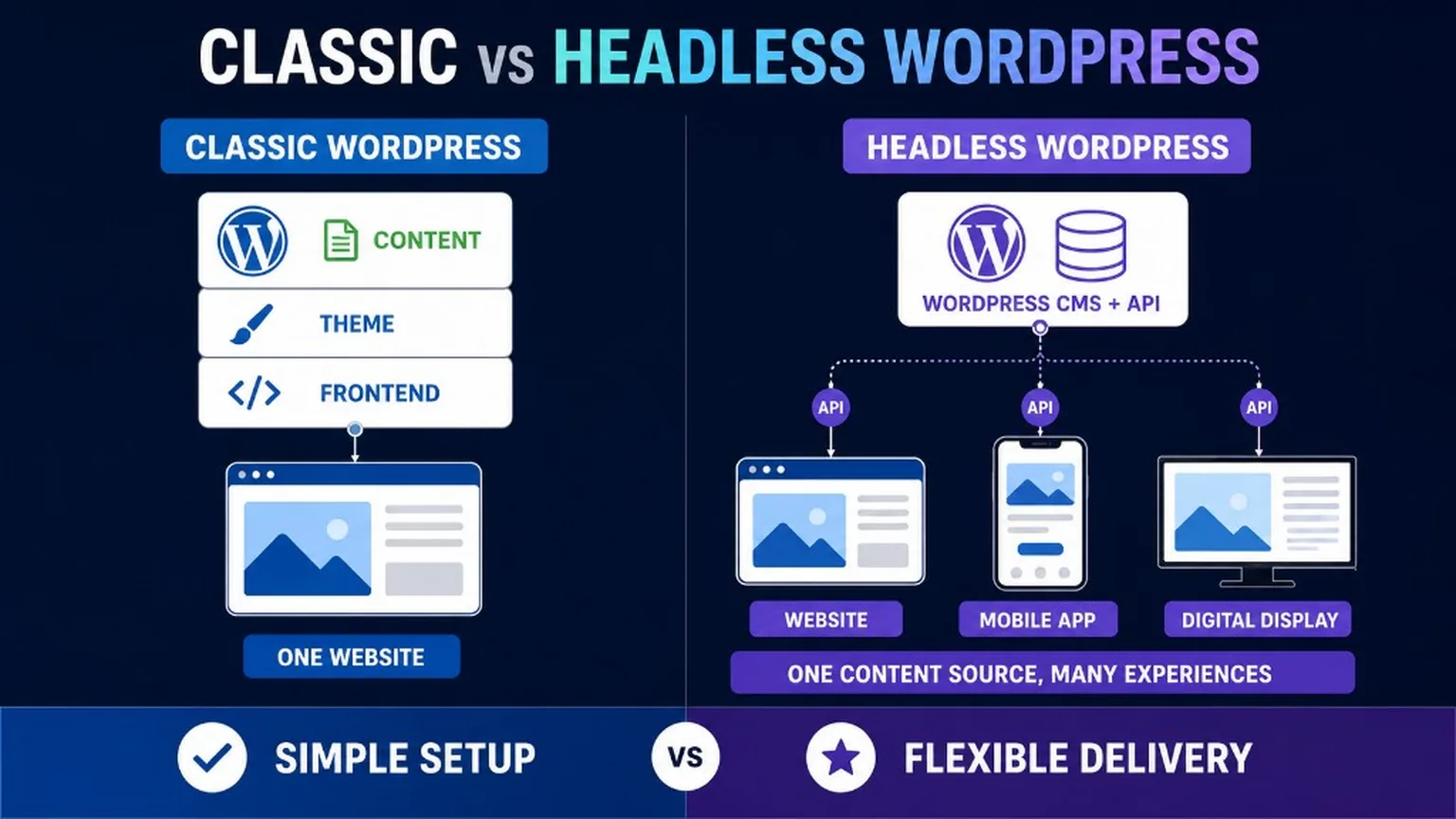
WordPress stores and edits content; a separate application decides how users see it.
In classic WordPress, the theme renders pages on the same stack as wp-admin. In headless, visitors usually never hit that theme. They hit Next.js, Nuxt, or another frontend that pulls posts, pages, and media through REST or WPGraphQL. Editors still work in wp-admin (or a customized editorial UI on top of the same APIs).
For WordPress 7 context and API surface changes, see WordPress 7 – what’s new.
Architecture building blocks
A production headless stack is more than “WordPress + React”.
Content API
- REST API (
/wp-json/) – built in; fine for many sites; watch pagination, embeds, and custom fields. - WPGraphQL – flexible queries for complex content models; another dependency to secure and cache.
- Custom post types, ACF/blocks, and media endpoints need an explicit contract the frontend can rely on.
Frontend application
- Framework choice (e.g. Next.js, Nuxt) owns routing, templates, and most UX.
- Design systems live here – not inside a classic theme.
- You need a real build/deploy pipeline (preview deploys, production promote, rollbacks).
Preview and drafts
- Draft/preview is the hard part: authenticated preview tokens, draft API access, and frontend routes that are not publicly indexed.
- Without preview, editors lose trust in the stack quickly.
Cache and delivery
- CDN / edge cache for HTML or static assets; purge rules when content updates.
- Application cache for API responses; avoid stale menus and prices.
- Object cache on WordPress still helps wp-admin and API generation under load.
Forms, search, auth, media
- Forms: post to a secure endpoint (WordPress REST, serverless function, or form SaaS) with spam controls and deliverability.
- Search: core WP search via API is rarely enough at scale – plan Algolia/OpenSearch/meilisearch or similar when needed.
- Auth: membership, gated content, and wp-admin are separate problems; do not expose privileged REST routes publicly.
- Media: decide whether images are served from WordPress uploads, a media CDN, or a build-time optimize step.
Classic vs headless vs custom app
Cost, team shape, and lock-in differ more than marketing slides admit.
| Classic WordPress | Headless WordPress | Custom app (no WP) | |
|---|---|---|---|
| Editing | Theme + plugins, familiar wp-admin | wp-admin (or headless CMS UI) + frontend previews | Custom admin or third-party CMS |
| Performance path | Caching plugins, host stack | SSR/SSG + CDN, API caching | Whatever you build |
| Team | WP generalist often enough | WP + frontend + DevOps | Full product engineering |
| Ongoing cost | Host + plugins + maintenance | CMS host + frontend host + two deploy paths | Highest build and ownership cost |
| Vendor lock-in | Theme/plugin lock-in | Frontend framework + hosting + API shape | Your codebase – still lock-in to your team |
| Best when | Brochure, blog, many plugins, small team | Multi-channel, custom UX, strong frontend needs | Product logic that is not content-centric |
Need integrations or custom tooling around either model? See API integrations and custom WordPress tools.
Security – a smaller public theme is not “more secure by default”
Headless can shrink the public PHP theme surface, but it does not remove risk.
- wp-admin, XML-RPC/REST, application passwords, and plugin vulnerabilities remain.
- The frontend adds dependency and supply-chain risk (npm packages, CI secrets).
- Misconfigured public API routes leak drafts or private fields.
- Treat security as layered: updates, least privilege, 2FA, WAF, backups, monitoring – same discipline as classic WP.
SEO for headless WordPress
Search engines need real HTML, clean URLs, and consistent signals – SSR/SSG are tools, not magic.
- SSR or SSG for indexable HTML; pure client-only rendering is a self-inflicted SEO wound.
- Canonical URLs owned by the frontend routing rules.
- hreflang if you run multiple languages – keep them consistent with CMS locales.
- XML sitemap generated from the frontend routes or a controlled CMS export – see XML sitemaps.
- Schema rendered in the HTML the crawler sees (not only in a detached WP plugin preview).
- Redirects and 404s implemented on the edge/frontend – old WP permalink redirects must be migrated.
- Preview and staging URLs must stay out of the index (
noindex, auth, or robots rules). - For AI citation and non-generic content patterns, see WordPress GEO.
Note: FAQ sections can still help humans and AI systems. Do not promise Google FAQ rich results – that SERP feature was retired for most sites in May 2026.
When headless is worth it (and when it is not)
Choose headless for multi-channel content, custom UX, or frontend-led teams – not as a status symbol.
- Good fit: large content sites, brand systems shared with apps, teams that already ship React/Vue, needs classic themes cannot meet.
- Stay classic: simple marketing sites, plugin-heavy shops that rely on Woo PHP templates, tiny budgets with no frontend ownership.
Summary
Headless WordPress is an architecture: API + frontend + preview + cache + SEO ownership.
It can deliver speed and flexibility, but it adds team and ops cost, and it is not automatically safer. Start from goals, then decide. Related: WordPress 7, sitemaps, GEO, integrations, and development and tools.