Why page speed still matters in 2026
Core Web Vitals are how Google and your visitors judge whether a WordPress page feels fast – and outdated advice like “merge every CSS file” can make things worse on modern protocols. Page speed is not a vanity score. It affects bounce rate, conversion, crawl efficiency, and how your site feels on mobile networks. Search engines still use loading experience as a ranking signal, but the metrics that matter have changed.Verified: July 2026 – thresholds and metric definitions follow Google Web Vitals and field vs lab measurement guidance.
Core Web Vitals you should optimize for
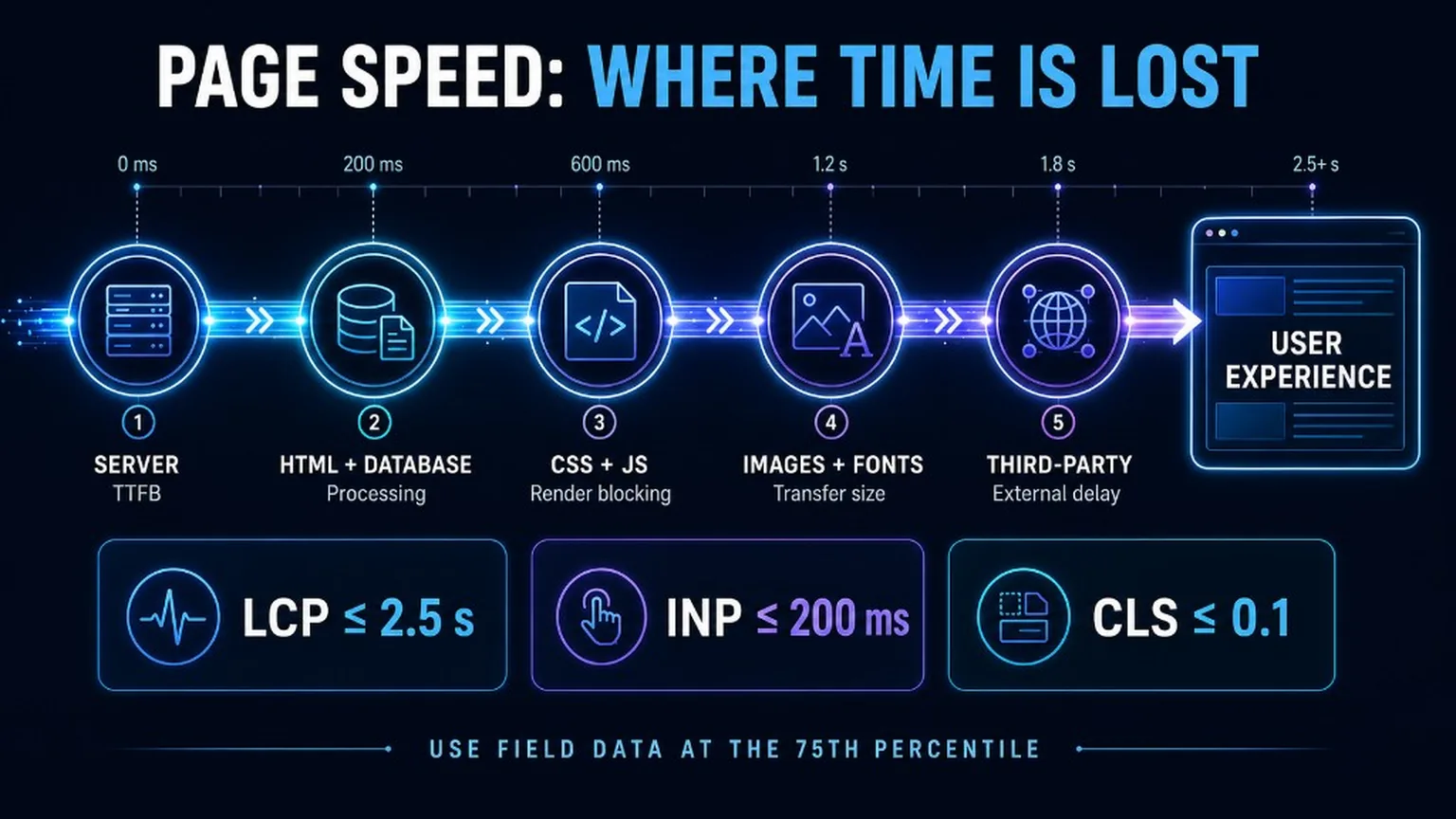
Target good scores at the 75th percentile of real users: LCP ≤ 2.5s, INP ≤ 200ms, CLS ≤ 0.1.- LCP (Largest Contentful Paint) – when the main content (often a hero image or headline block) becomes visible. Goal: ≤ 2.5 seconds at p75.
- INP (Interaction to Next Paint) – how quickly the page responds to clicks, taps, and key presses across the visit. Goal: ≤ 200 milliseconds at p75. FID is outdated and is no longer a Core Web Vital.
- CLS (Cumulative Layout Shift) – unexpected movement of visible content. Goal: ≤ 0.1 at p75.
Field data vs lab data
CrUX and RUM tell you what real users experienced; Lighthouse and similar tools help you diagnose why.- Field (CrUX / RUM) – anonymized Chrome UX Report data and your own real-user monitoring. This is what Google primarily uses for Core Web Vitals assessment.
- Lab (Lighthouse, WebPageTest, many PSI details) – controlled conditions. Useful for debugging TTFB, render-blocking resources, and layout shifts.
Stop auto-merging all CSS and JavaScript
On HTTP/2 and HTTP/3, blindly concatenating every stylesheet and script often hurts caching and deploys more than it helps. Older guides pushed “combine all CSS/JS into one file.” That advice came from HTTP/1.1 connection limits. Today:- Browsers can fetch many small files in parallel over HTTP/2/3.
- One giant bundle invalidates the whole cache when you change a single button style.
- Critical CSS inlining and selective defer/async usually beat “merge everything.”
Server response, caching, and delivery
A slow TTFB undermines every frontend trick; page cache, object cache, and CDN are the foundation.- TTFB – time to first byte. Hosting, PHP version, database queries, and missing page cache dominate here.
- Full-page cache – serve HTML for anonymous visitors without bootstrapping WordPress on every hit.
- Object cache (Redis/Memcached) – cut repeated database lookups for options, transients, and WooCommerce data.
- CDN – put static assets (and preferably HTML edges) closer to users. See also Connect an external CDN.
- Brotli / Gzip – compress HTML, CSS, JS, and SVG at the edge or origin.
Images, fonts, and third-party scripts
Hero images and fonts decide LCP; analytics and chat widgets often decide INP.- Images – modern formats (WebP/AVIF), correct dimensions,
srcset/sizes, andfetchpriority="high"for the LCP image. Do not lazy-load above-the-fold heroes. Details: Image optimization guide. - Fonts – limit families/weights, use
font-display: swap(or optional), preload only the critical face, prefer system stacks where branding allows. - Third-party scripts – load marketing tags after consent and after interaction where possible; audit tag managers quarterly.
- Preload critical resources – LCP image or critical font only, not everything. Snippet: Add preload for critical resources.
Database, cron, and WordPress hygiene
Bloated options tables, runaway cron, and unused plugins quietly destroy TTFB.- Remove abandoned plugins and themes; keep WordPress, PHP, and MySQL/MariaDB current on staging first.
- Clean transients, revisions policy, and expired sessions; watch Autoloaded options size.
- Use system cron instead of high-traffic
wp-cronon busy sites. - Profile slow queries (Query Monitor on staging) before throwing more CPU at the problem.
Practical optimization order
Fix the biggest field regressions first, then polish.- Confirm field CWV in Search Console / CrUX and pick one template (home, product, article).
- Fix TTFB: hosting, page cache, object cache, PHP 8.3+ where the stack allows.
- Fix LCP resource: image weight, preload, server timing, render-blocking CSS.
- Fix INP: long tasks, heavy main-thread JS, third parties, interaction handlers.
- Fix CLS: dimensions on media/ads/embeds, font swaps, late-injected banners.
- Re-measure field data after traffic accumulates; keep a performance budget in your release checklist.
Key takeaways
- Optimize for LCP, INP, CLS at p75 – not FID and not a single lab score.
- Treat field and lab as different tools; Lighthouse alone cannot prove INP.
- Do not auto-merge all CSS/JS on HTTP/2/3 stacks without measuring.
- Win speed with TTFB, caching, CDN, lean images/fonts, and fewer third parties.
- Keep a performance budget and re-check after every major plugin or theme change.